


Home
  • Guides
  • Forums
  • Contribute!
  • Jame's Blog
  • Rankings
  • Needed Guides
Urban Rivals


Recent comments

  • You can resize images easily
    1 hour 24 min ago
  • format
    9 hours 24 min ago
  • Get quest and finished Linked
    11 hours 46 min ago
  • Didn't load?
    13 hours 24 min ago
  • Never mind
    15 hours 31 min ago
  • Image
    15 hours 49 min ago
  • Sure, that's absolutely a
    22 hours 37 min ago
  • Congrats. Last time I
    1 day 5 hours ago
  • Alright, this is how Wild
    1 day 4 hours ago
  • Hey eric, I think I'm going
    1 day 8 hours ago

World of Warcraft Pro newsletter

Stay informed on our latest news!

Previous issues

Previous issues

  • October 2008: WOTLK Guides, Karma System, New Videos and More!
Syndicate content
Home » Guides » General Guides » Addons and other Utilities

Using Steam's In-Game Browser with WoW

Submitted by Eamo on Mon, 2009-01-05 15:10.


4
Average: 4 (4 votes)

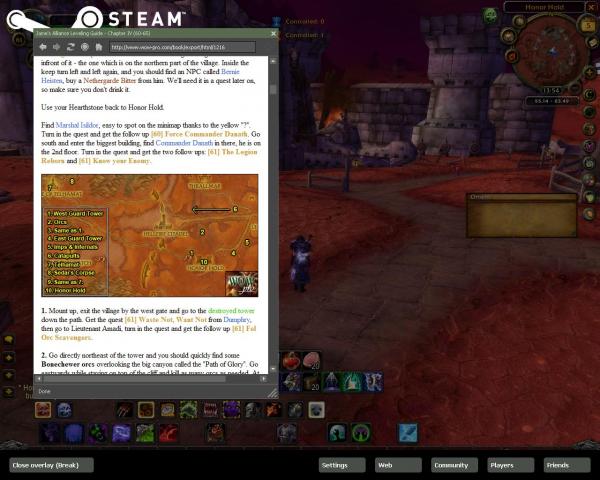
Any of you who use Valve's Steam might be interested in using it's in-game browser while playing World of Warcraft.

It looks something like this:

To use this feature you need to do the following.
1. Install Steam. You can download it for free from www.steampowered.com.
2. Add a shortcut to WoW to your steam My Games tab. (Click Games->Add a non-Steam Game to My Games List, then wait for WoW to show up in the Choose Application dialog and add it).
3. Launch WoW through Steam, click the My Games tab and launch WoW. You must launch through here or the steam functionality will not be available in game.

While in game you can now press Shift-Tab to go to the steam menu within WoW, from here click web and it will open a web-browser, just enter the wow-pro url and go to the guide you want. I find if you go to the print friendly version it works much better as you probably wont want to stretch the browser to cover the whole screen.

Voila you can now view a web-browser while playing the game which makes using the guides here incredibly easy. It is also very handy for wowhead, wowwiki pages etc while playing as you can still see your game as you look these up.

Some notes:

The Shift-Tab key combo to bring up the Steam UI causes some issues. Firstly, it is used for a couple of things within WoW, namely switching to previous target and going to previous text edit box (if typing in prices at the AH for example). It also seems to sometimes leave WoW thinking that the shift key is held down after you go back to the game requiring you to tap shift to clear it. Not serious but annoying and would probably drive you nuts if you are tanking. To change the key that is used click File->Settings and change it from the In-Game tab in Steam. I use the Pause/Break key which I never use for anything else and is far away from any keys I do use and it seems to work perfectly).

The browser does seem to freeze every now and then, it seems to work but the view doesn't update when you scroll up and down. Just close the in-game browser and start it again seems to fix this.

‹ User Interface Guide (UI guide)upTechnical Issues ›
  • Printer-friendly version
  • Login or register to post comments
Member

I never thought about doing

Submitted by Pippah on Mon, 2009-01-05 22:30.

I never thought about doing that before. If they can get the twitches worked out it could be a pretty cool way of browsing to the guide.

  • Login or register to post comments
Trusted Member

It's nice, but...

Submitted by gregshutdown on Mon, 2009-01-05 19:29.

It's nice, but I prefer using the tip that Jame proposed: Change WoW to work in maximized window mode (looks absolutely the same), and Alt+Tab to your browser. With this, the alt-tabbing will work instantly, and if your browser is not maximized- you'll still see the WoW window in the background Smiling

  • Login or register to post comments
Trusted Member

That works too

Submitted by Eamo on Tue, 2009-01-06 12:09.

Yeah, I sometimes do that and it works fine. I find the steam browser works better at times I may actually want to alt-tab out of WoW and do something else too though. While WoW is running windowed + maximised it is always chewing up CPU time and graphics resources which makes anything else I do at the same time a lot slower.

Just running WoW through steam in normal fullscreen mode seems to make my PC a lot more responsive at times I actually do want to alt-tab out of WoW.

  • Login or register to post comments
Jiyambi's picture
Moderator

While this is nice, I have

Submitted by Jiyambi on Tue, 2009-01-06 11:14.

While this is nice, I have found that it causes my WoW to be very jumpy, as if the FPS had dropped (though it supposedly hadn't).

  • Login or register to post comments
Member

steam add-on

Submitted by Markness on Fri, 2009-01-16 01:42.

Did they get rid of that beta? I can't see it on my list.

  • Login or register to post comments
Trusted Member

Guide has been updated

Submitted by Eamo on Fri, 2009-01-16 16:34.

The guide has been updated to reflect the fact you no longer need to opt into the client test beta and should work fine as written again.

  • Login or register to post comments
Trusted Member

Yes they did

Submitted by Eamo on Fri, 2009-01-16 16:28.

Yeah, the beta is gone. The functionality is builtin to steam now, I will get this updated to reflect that.

  • Login or register to post comments

About the author:

Eamo's picture
Trusted Member

Level of Addiction
hardcore raider

View full user profile

User login

  • Create new account
  • Request new password

Navigation

  • Guides
    • General Guides
      • How to Write a Guide
      • Achievement Guides
      • Attunements and Keys
      • Guild & Raid Guides
      • How to Make Macros
      • How to obtain certain items
      • Outdoor Raid Encounters
      • PvP
      • Quest Chains
      • Reputation Guides
      • WotLK Daily Quests
      • WotLK Daily Quests
    • Leveling Guides
    • Class Guides
    • Gold Making Guides
    • Instance Guides
    • Tradeskill Guides
    • Guides in Other Languages
    • Needed Guides
  • Home
  • Leveling Guides 1-80
  • Wiki Pages
  • Create content
  • Polls
  • Recent events
  • WoW Dictionary
  • FAQ
  • Contact

Who's online

There are currently 1 user and 573 guests online.

Online users

  • Smirdzius
©2004-2009 All Information provided on this site is property of WoW-pro.com. All rights reserved. The comments are property of their posters. World of Warcraft® and Blizzard Entertainment® are all trademarks or registered trademarks of Blizzard Entertainment in the United States and/or other countries. These terms and all related materials, logos, and images are copyright © Blizzard Entertainment. This site is in no way associated with or endorsed by Blizzard Entertainment®.
RoopleTheme
RiaCréation - Creation de site internet Referencement Référencement