

 by Ludovicus_Maior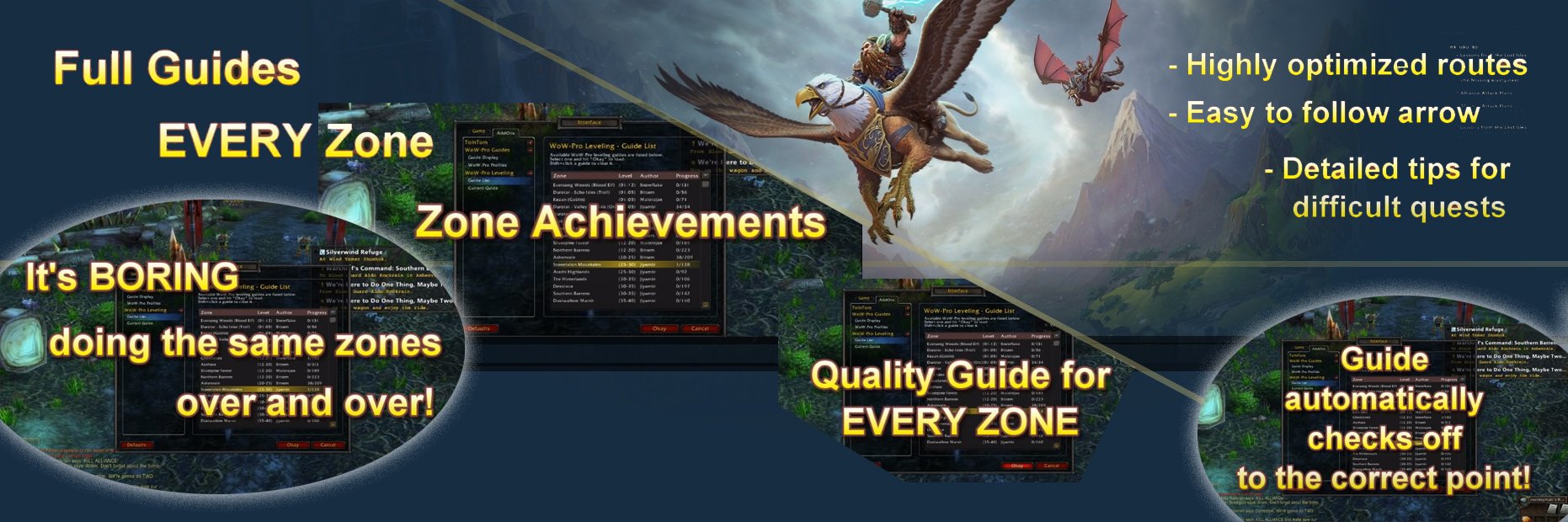
 |
 Universal Addon Download Button above. |
Current Version: v2023.10.11.A
Last Update: 2023-10-11
Next Update: 2023-11
📰 For the Paper Guides, check out our 2023 updated list here : WoW Classic Leveling Guides
Still don’t believe us? Check out our User Testimonials!
 |
 |
 |
 |
|
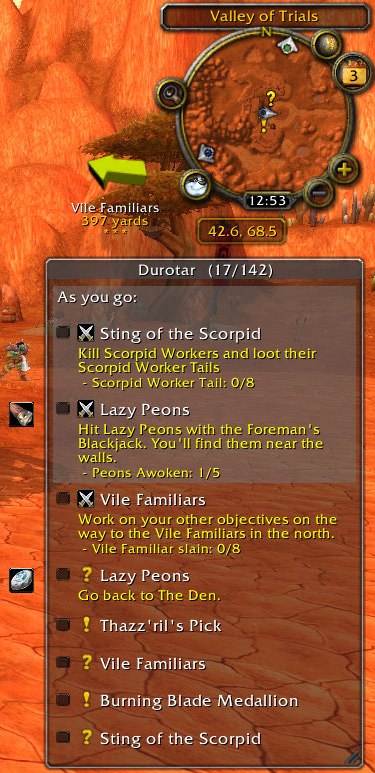
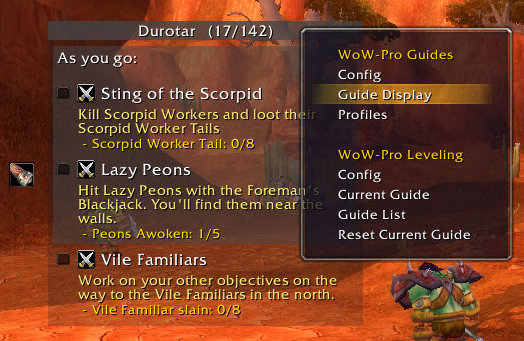
Basic Guide Window
|
Minimalist View
|
Dropdown Menu
|
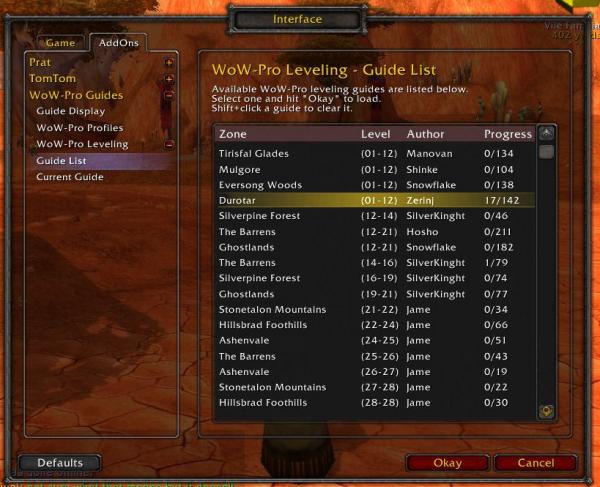
Guide List
|
How To Install:
- Download the addon using the big shiny button.
- Download TomTom from WoW Interface or Curse. TomTom is important! Without it, you won’t see the arrow telling you where to go! Get version 3.1.4 or later.
- Unzip the downloaded files into your addons directory. (How do I unzip the file?)
Windows 7/8 location:C:\Users\Public\Games\World of Warcraft\_retail_\Interface\AddonsC:\Users\Public\Games\World of Warcraft\_classic_\Interface\Addons
Mac location:Macintosh Main HD/Applications/World of Warcraft/_retail_/Interface/AddonsMacintosh Main HD/Applications/World of Warcraft/_classic_/Interface/Addons - Log into the game. In the lower left-hand corner of your character select screen, you should see an “Addons” button. Click it. The WoW-Pro addon and TomTom should both be listed. Make sure they are checked, and you’re ready to go!
- If you have any trouble installing the guide, stop by our Addon Help Chat Room to get help!
You can also visit the WoW-Pro Leveling Addon Troubleshooting Guide, where you’ll find a fix for most common issues.
Don’t miss out on updates!





Features:
- Will cover EVERY zone, not just the “best” ones
- Automatically checks off steps as you progress through the guide
- Completely customizable view
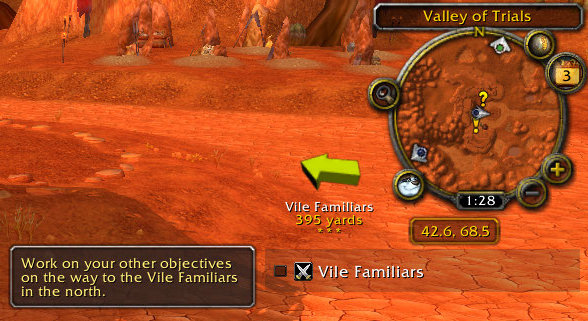
- Arrow and map points show you exactly where to go
- Adjustable XP settings work with…
- Heirlooms
- Recruit-A-Friend
- Dungeons
- PvP
- Works great with partially leveled characters
- Integrated quest tracker (can be disabled if desired)
- Integrated quest item buttons
- Supports step skipping (the guide knows the difference between a skipped step and a completed step)
- Innovative “sticky steps” help you manage quests you need to complete as you go!
Have a bug to report? Want to help us update guides? Check out our community page!

The Addon Dev Team
Lead Developers:
- Core Addon: Jiyambi/Silvann/Ludovicus
- Leveling Module: Jiyambi/Ludovicus
- Dailies Module: Jiyambi/Twists/Ludovicus
- Professions Module: Ludovicus
Development Team:
- Dunevon
- Gameldar
- Gylin
- Jiyambi
- Ludovicus
- Shakazahn
- Silvann
- Twists
| Guide Writing: | |||
|
|
|
|
| Guide Coding: | ||
|
|
|
| Testing: | ||||
|
|
|
||

No more leveling guides? This addon was perfect, but now I can’t access leveling guides or anything I used to be able to not a few weeks ago. What happened? 🙁
Please revert to or upload the old version where you had a proper guidelist with all the regions separated.
This was 1000x better and now it’s gone.
Could we please have an addon version with all zones. I’m a quest completionist and the old version was perfect when it had all zones in it.
Classic Era/Vanilla
Yes, it is. Here’s the latest version:
https://s3.amazonaws.com/WoW-Pro/WoWPro+v2023.10.11.A.zip
TomTom 3.5.1 or later required :
https://www.curseforge.com/wow/addons/tomtom/files
Note: If you get a warning with SetPassThroughButtons in it, we do not call that function and it is another add-on.
Is this AddOn compatible with WotlK Patch 3.3.5. ?
Does this work with classic and/or vanilla wow?
Heck I can’t remember, but back then I hit level 70 before anyone on my server, and that’s with a normal sleeping schedule + other obligations fulfilled.
Hi all, whats the estimated time to hit 70 with this route? And do you hit 70 + end of campaing with this route?
Cheers
Level requirements to start a certain path should be removed.
Level requirements for the Wrath TBC guides are broken. It presumes you are at level 62 when finishing Hellfire, but requires 64 to load the Zangarmarsh guide. This is an issue for several if not all the TBC guides in the Wrath directory, Hellfire will not load unless you are level 60, when most people will be going to Hellfire at 58.
The coordinates on the Alliance Levelling 25-30 guide are all wrong
In order for the addon and it’s community to thrive, they need people to visit their Discord (https://discord.gg/aarduK7). They provide updated leveling addons there in the #releases channel. The addons and their guides are still 100% FREE, you just need to download it there instead of here to get the full, most recent version.
Hello, and thanks for making such a fantastic addon. I started with Jame’s guide way back when it was still only availalble as a webpage (with lots of alt-tabbing) and was delighted to find this addon years ago also.
I’ve just come back to wow after a year off cause Shadowlands is dropping soon and of course I had to get wow-pro addon again! I downloaded the latest version, which seems to be from August and i can’t being any of the level requirement guides cause level squish has happened. Please are there any plans to amend the guide with these new levels in mind?
I appreciate it would be a mammoth task, and if it’s not going to happen then fair enough.
Krasarang WildsWaypoints in the Krasarang Wilds are off by around 200 yards southwest.
James Leveling Guide Chapter3Is there any reason James levelling guise chapter 3 hasn’t been included?
James Leveling Guide Chapter3Is there any reason James levelling guise chapter 3 hasn’t been included?
Efficiency Question & Thanks.Hello, thank you for this addon – it works flawless and smoothly unlike many of the others available.I am a new person who just heard of this sight via Youtube and ClassicWoW.I am just wondering what the average playtime is for hitting 60 while following this guide.Is this a fast leveling guide for efficiency?Thanks,Chir
RE: Captcha, etcCome to Discord, no Captcha! https://discord.gg/8bk6978(think Critters voice here)The problem with zone by zone leveling is all the quests require so much hoping around. I also dislike the 10 – 30 steps per guide, which is why we are slowly going to the 10 levels per guide. The reason the old guides were taken off the index, was we realized those were actually guides written for version 2.0 of the game ans so had some invalid quests and/or flight paths.
Reverting to Zone leveling for ClassicHi,Thanks for the addon, I’ve used it since the paper version (still have it…)Is it possible to revert the leveling guides to zones guides for Classic please? It’s highly inefficient with all the zone changing and low frop rates for items (specially the Ashenvale/Stonetalon parts)Or is it possible to have the old guide to use the zone leveling ? The change occured like one week ago I think, I was on the Wetlands zone and I was asked to go to Dun Morogh (!! I was lvl 18!), Westfall, Redridge, Loch Modan, Duskwood, etc…You could regroup the current guide to something like 1-30 and then going on with Jame guides.I really don’t like the current 10-30 steps guide, I prefer the old zones guides.Thanks,Kinder(BTW, your captcha is crappy
Re: Long time user is thankfulThank you Amardon !
Long time user is thankfulI just wanted to add a comment, so I am doing that. I hope the right people read this. I have been using your guides since I had to print them out (in full color) on reams of paper. I find myself after all these years unable to play the game without them. 😀 I just wanted to thank ALL of you from the bottom of my heart for all you do.
Addon Directory MovedAt least on my system (Win 10 64), seems Blizzard moved the directories around with the 8.1.0 patch. The addon directory now lives here:
C:Program Files (x86)World of Warcraft_retail_InterfaceAddOns
wrong npc nameVol’Dun guide horde: Liquid Motivation has Taz’jin as the person to accept the quest, but its actually Zauljin <Drunkard> that gives the quest. just wanted to inform for later guides.
hide in combati was just wondering if there is any plans in the future to add an option to hide the guide in combat? or is there a code i could add myself to acomplish this? (not great with coding but i try lol)
Great addon, but it seems toGreat addon, but it seems to be stuck on the step for taking the boat to Atal’gral. It just doesn’t want to go to the next step after taking the boat to Atal’gral. I’ve tried reloading, restarting…and nothing. Any suggestions? Also, this website needs a new Captcha system badly. Most of the time the characters are way to illegible.
RE: ChangelogSorry missed your question about changelog. Each update has a list of changes posted on the main page (www.wow-pro.com). You would have to scroll thru there to find older updates. Also each guide has a list of the changes as part of the header. The copy downloaded to your computer will only have the last few (10?) changes, but here on this website is the entire history of a guide files changes, under the revisions tab.
RE: repeating stepsAre you talking about rares in Stormsong? There were several incomplete steps in the Stormsong guide (I think all of the rares) This has been at least mostly fixed and can be copied from here (or Github) and will be available in the next full download. They have been hard at work giving that guide the polish it needed.
RE QuestionsYes, this is a legit addon that if you are using it as written will not get you banned. *I suppose it is possible to modify it in some way to misuse it, but off the top of my head, I don’t see how.
Rare Elites?The guide warns you that you can do all rare elites daily for Azerite Power and a chance of the rare item rewards. As such, their quest markers get reset and reappear in the guide… either skip them or set the guide to rank 1.
Questions So these add-ons are all perfectly legal from my. Understanding and can’t result in a ban. Correct me if I am wrong please and thank you
RE: Cross Faction GuideAwesome, thanks for the reply! I look forward to whatever comes out of it, I really enjoy these guides.
Making me run to places i already wasErased my old folders and replaced them with the new .1G ones. soon as i logged in, the guide started to tell me i need to go kill people i had already killed. course been lil bit so i am running to the spots then remembering i killed this and that mob already. did a reset of the guide i’m using, didnt change anything.
RE: Cross Faction GuideIt is something I want to do. But currently don’t have the bandwidth. The horde war campaign is done, which contains some of that. The next biggest problem (after time) is deciding the format it should take. It seems to me, these quests will mostly be done while running around doing world quests. Since we can’t predict what order someone will have world quests show up in, it is impossible to decide what order to put the quests in. Should it be one guide for all of Horde Kul Tiras and one for Alliance Zandalar, or one for each zone? So, short answer is yes, but I don’t know when.
QuestionsHi there! Any chance we’ll get guides for the cross-faction locations (KT for Horde, Zandalar for Alliance) for things like quests/rares/etc? Also, is there a changelog for the addon anywhere?
Re: Flight/travel points not savingYup! That is fixed in 8.0.1G.Download it fast!
Flight/travel points not saving8.0.1FWhen visiting a flight master, I am getting the messages below in chat. Seems FPs are discovered and immediately unlearned.WoWPro: Discovered Flight Point: [Fallhaven]WoWPro: Discovered Flight Point: [Fletcher’s Hollow]WoWPro: Removed Unlearned Flight Point: [Fallhaven]WoWPro: Removed Unlearned Flight Point: [Fletcher’s Hollow]WoWPro: Discovered Flight Point: [Tradewinds Market]WoWPro: Removed Unlearned Flight Point: [Tradewinds Market
Re: hard crash when selecting guideSorry about that. Version v8.0.1F should fix your problem.Look for it later today!
hard crash when selecting guideselecting a guide in WoW Pro v8.0.1E cause WoW to instantly crashalso, there’s no zuldazar guide anymore also also, your captcha is the worst i have ever seen and doesn’t work 80% of the time
WorkaroundAs a workaround, I opened up WoWPro.lua and made my preferred display settings the default: border = false,textsizes = 16/14/12,numsteps = 3, At least now I only need to turn the guide I want back on when I login…
Me tooWiping your WoWPro saved variables seems to help for a day or 2, but the problem persists… my short term solution was to edit WoWPro.lua to make my preferred settings default: No border, 3 steps visible, fonts sizes of 16 for quest names,14 for objectives, and 12 for notes… all of this is in plain text, so it’s easy to set… Now all I have to do when I login is repick the quide I was using… and with BlizzBugsSuck, I can actually open the options menu right to the Guide List menu.
Settings not saving upon exiting gameHiya,I don’t know whether this is the addon or whether it’s the client itself, but whenever I exit the game, the guide and quest level I’ve set do not save and upon logging back in, are reset to default (no guide and quest level 2). In addition, the minimap icon resets its position. None of my other addons seem to be doing this.It’s not a major issue, but it is inconvenient and a bit annoying.Thank you~
Tannan Jungle guide, from Draenor not showing upTannan Jungle, Draenor guide not showing up on leveling tab, neither on achievement,